
Showing posts with label gentoo. Show all posts

Thursday, November 04, 2010

A server is a server is just a server

Gentoo Linux

In the process of getting the Horde4 packages ready for the Kolab Server the p@rdus development environment needed some love. Besides a few minor updates it remained virtually unchanged during the last two years.

The process started with an update of the underlying Gentoo base. Which took a few hours to compile. And of course there were a few problems associated. Which also took some time.

Subsequently the configuration via puppet didn't really work out. Some additional obscure issues. More time.

And ultimately the bundling and upload of the updated image didn't work. Even Google wasn't able to help this time.

All that is fine if the required time is available and if the stuff learned while fixing the issues means progress for yourself. But it is a fact: there is neither the time nor does fixing obscure issues align with the targets at hand. The server setup and upgrade must complete in minutes and not hours. It is "just a server" after all.

Sigh... I love Gentoo. I have been a Gentoo developer. I wrote a book about this distribution. Giving up on my developer status for Gentoo was hard. Giving up on Gentoo... damn. Nevertheless: Farewell.

Wednesday, December 02, 2009

A parting gift

I have become increasingly unreliable concerning my activities within the Gentoo developer community during the last year. Now I finally arrived at the point where I consider the only reasonable solution to leave the Gentoo team. The final drop has been the fact that I promised Sebastian the next layman release. But week after week I did not find the time to work on the next version thus failing the promise.

With my commercial endeavours within the Kolab and Horde communities thriving I have to be realistic: The workload won't suddenly fade during the next year(s?). I would have liked to include Gentoo into the portfolio I get paid for but I was unable to achieve that. Chances are that I would be even less responsive concerning Gentoo in the future.

This is no easy decision for me as I do like Gentoo and feel strongly for some of the stuff I did for Gentoo. It is not easy to drop these projects. I would have made the choice earlier in order to clarify the situation if I would not care that much about Gentoo. But I left people with an unresponsive maintainer this way and I'm sorry for that.

There is one final thing I'd like to leave as a parting gift to the Gentoo community.

As some of you may know I wrote a german book about Gentoo. When I initially started the project I asked the publisher if there would be any possibility to produce a free version of that book, too. Writing about free software feels strange to me if the things I write are not free. But books are not software and I had to accept the commercial realities of the project at that time.

But I mentioned above that things for my little one-man-company are going well and so I did buy the rights to my book back. It has now been published under a free license and is available for download here. The latex source for the book is here.

Time to say goodbye. Sigh...

Monday, October 12, 2009

layman moves from subversion to git

In preparation for layman-1.2.4 the repository has been converted from subversion to git. The new repository can be found at git://layman.git.sourceforge.net/gitroot/layman/layman

Thursday, January 01, 2009

layman-1.2.3 is out

The next layman version has been released and fixes a few minor bugs:
  • Support setting the terminal screen width (#253016)
  • layman -S fetches each overlay twice (#253241)
I can't seem to get layman bug free these days. I already wanted to mark the newer version stable months ago. Let's hope there'll be a longer bug free period now ;)

Sunday, December 28, 2008

layman-1.2.2 is out

The next layman version has been released and fixes a few minor bugs:
  • layman -L: better use of screen real estate for source URLs (#251032, submitted by Martin von Gagern)
  • Execute subprocesses in a shell. (#235165)
  • layman/overlays/git.py (GitOverlay.sync): app-portage/layman - 'layman -S --quiet' yields "git: 'pull-q' is not a git-command." (#247964)
Thanks to all the contributers!

Saturday, November 15, 2008

layman-1.2.1 is out

The next layman version has been released and fixes a few minor bugs:
  • Fixes for python-2.6 (#237625, submitted by Mike Auty)
  • Better locale support (#235165, submitted by A. F. T. Arahesis)
  • Handle git+ssh://, ssh:// correctly (#230702, submitted by Donnie Berkholz)
  • Do not remove directories if adding an overlay failed (#236945)
In addition there is a feature enhancement:
  • Pass --quiet flag down to the version control system (#236165, submitted by A. F. T. Arahesis).
Thanks to all the contributers!

Wednesday, July 09, 2008

"Gentoo Linux" as an e-book

The book is now available as an e-book, too.

In a way I'm still unhappy that it is not available as a free PDF. But on the other side that would be unfair to the amount of work invested by the publisher. It actually helps a technical guy like me to get the message across if there are people knowledgeable about writing helping in the process. I'm at least not that much into code that I am unable to judge the quality difference between what I can write and what I got back from OpenSourcePress.

Still, I retain the hope that it will be as free as the software I write at some point in the future.

Sunday, May 18, 2008

Using puppet on Gentoo

Puppet is a tool for managing your system configuration. It provides a complete language for expressing and realizing system settings. After some introductory words this post will focus on a Gentoo specific puppet module for managing package installations.

If you have no clue about puppet you might wish to read the introduction if you are interested in managing the configurations of your system in an efficient way. The discussion about the gentoo specific module will only be of interest to you if you already know the basics of writing puppet modules.

Introduction

What are the advantages of using puppet rather than editing all files in /etc by hand?

  • Using puppet means you create a repository of your configuration knowledge
  • You can replicate all of or part of the settings to another host
  • In addition you can version control and share your knowledge in a repository

Mind you: If you are only managing a single host you might not find much value in the items listed above. Indeed puppet only becomes useful if you really wish to apply a complex configuration over many hosts.

But of course this is true for any groupware server and in particular the Kolab Server. Porting Kolab to Gentoo is a project I have been working on for more than three years now.

The initial version (Kolab2/Gentoo-2.1) failed to make me really happy. One central reason for that has been the configuration tool provided by Kolab. While it works fine for the original version of the Kolab Server it simply fails to cope with the amount of options users have on Gentoo.

I always wanted to merge my own crappy tool for configuration management with the code from the Kolab Server. But a kind anonymous voice answered to the blog post linked in the previous setence, telling me that this is a stupid idea and I should use puppet. He was right.

So I'm establishing the Kolab2/Gentoo groupware server configuration based on puppet at the moment. As this includes generating some Gentoo specific modules for puppet it is now time to stop the introductory words and get down to some puppet code.

Installing packages for generic distributions

In order to tell puppet that you wish to have a single package installed you would use a construct like this:

package { openldap:
  ensure   => 'latest',
}

This works fine on most distributions but on Gentoo you might ask about support for use flags, keywords and masking.

Installing packages on Gentoo

My solution is the puppet module os_gentoo.

This module is mainly concerned with management of the files/directories you find at /etc/portage/package.* in your Gentoo system. In order for puppet to manage these paths it makes sense to convert these into directories.

The module provides four central parts:

  1. Backup of the original contents of /etc/portage/package.* if these were files.
  2. Converting the paths into directories.
  3. Restoring the original file contents as /etc/portage/package.*/package.*.original.
  4. Providing functions to easily manage use flags, keywords and masking for other packages.

Backup of /etc/portage/package.*

If the user managed /etc/portage/package.* as files we need to grab the content and store it. Puppet provides the file() function for that but that function will fail if it sees a directory. So we need to determine if the path already is a directory. We need to write some ruby code at this point and create a new fact:

# Determine if these are regular files
 
package_use = '/etc/portage/package.use'
 
Facter.add('use_isfile') do
  setcode do
    if FileTest.file?(package_use)
      true
    else
      false
    end
  end
end

...

Facts are little pieces of system information that puppet determines automatically using the tool dev-ruby/facter. The code given above checks if /etc/portage/package.use is a file and places that information in the variable use_isfile. We will shortly meet that variable again.

This fact is something we store as a plugin at os_gentoo/plugins/facter/portage_dirs.rb within the module.

The code actually performing the backup is packaged in a puppet class:

# Class gentoo::etc::portage::backup
#
# Stores user settings in the /etc/portage/package.* files.
#
# @author Gunnar Wrobel 
# @version 1.0
# @package os_gentoo
#
class gentoo::etc::portage::backup
{
  if $use_isfile {
    $use = file('/etc/portage/package.use')
  } else {
    $use = false
  }
  if $keywords_isfile {
    $keywords = file('/etc/portage/package.keywords')
  } else {
    $keywords = false
  }
  if $mask_isfile {
    $mask = file('/etc/portage/package.mask')
  } else {
    $mask = false
  }
  if $unmask_isfile {
    $unmask = file('/etc/portage/package.unmask')
  } else {
    $unmask = false
  }
}

Here we meet the variables again. In case $use_isfile is true the file contents will be parsed into $use. Otherwise the variable is set to false. We return to our backup two sections further down.

Converting /etc/portage/package.* into directories

Now that we have saved the file contents we can safely convert the files into directories. Puppet would not destroy the original files but instead store them in an archive. But recovering them from there would be cumbersome for the user. Automating the conversion seems to be a better solution.

Requiring a path to be a directory is easy in puppet:

# Class gentoo::etc::portage
#
# Ensure that all /etc/portage/package.* locations are actually
# handled as directories. This allows to easily manage the package
# specific settings for Gentoo.
#
# @author Gunnar Wrobel 
# @version 1.0
# @package os_gentoo
#
class gentoo::etc::portage
{
  # Check that we are able to handle /etc/portage/package.* as
  # directories
 
  file { 'package.use::directory':
    path => '/etc/portage/package.use',
    ensure => 'directory',
    tag => 'buildhost'
  }
 
  file { 'package.keywords::directory':
    path => '/etc/portage/package.keywords',
    ensure => 'directory',
    tag => 'buildhost'
  }
 
  file { 'package.mask::directory':
    path => '/etc/portage/package.mask',
    ensure => 'directory',
    tag => 'buildhost'
  }
 
  file { 'package.unmask::directory':
    path => '/etc/portage/package.unmask',
    ensure => 'directory',
    tag => 'buildhost'
  }
}

Again the four actions have been packaged into a single puppet class. The different actions all have a buildhost tag. This is only required if you really use a build host structure with your servers and plays no role otherwise.

Restoring the original /etc/portage/package.*

Now that puppet converted /etc/portage/package.* to directories we lost the original file contents. Another class will rescue them:

# Class gentoo::etc::portage::restore
#
# Restores user settings from the /etc/portage/package.* files.
#
# @author Gunnar Wrobel 
# @version 1.0
# @package os_gentoo
#
class gentoo::etc::portage::restore
{
  if $gentoo::etc::portage::backup::use {
    file { '/etc/portage/package.use/package.use.original':
      content => $gentoo::etc::portage::backup::use,
      tag => 'buildhost'
    }
  }
  if $gentoo::etc::portage::backup::keywords {
    file { '/etc/portage/package.keywords/package.keywords.original':
      content => $gentoo::etc::portage::backup::keywords,
      tag => 'buildhost'
    }
  }
  if $gentoo::etc::portage::backup::mask {
    file { '/etc/portage/package.mask/package.mask.original':
      content => $gentoo::etc::portage::backup::mask,
      tag => 'buildhost'
    }
  }
  if $gentoo::etc::portage::backup::unmask {
    file { '/etc/portage/package.unmask/package.unmask.original':
      content => $gentoo::etc::portage::backup::unmask,
      tag => 'buildhost'
    }
  }
}

For each of the four paths the original backup variable (e.g. $gentoo::etc::portage::backup::use) is checked for content. We need to use the full class path here to access the variable content. If it contains content it will be written to the corresponding new path (e.g. /etc/portage/package.use/package.use.original).

Handling /etc/portage/package.* with puppet

Now the management of /etc/portage/package.* becomes easy as puppet can place new files for every package or set of packages that requires special use flags, keywords or masking.

This is an example for the use flags:

# Function gentoo_use_flags
#
# Specify use flags for a package.
#
# @param context A unique context for the package
# @param package The package atom
# @param use The use flags to apply
#
define gentoo_use_flags ($context = '',
                         $package = '',
                         $use = '')
{
 
  file { "/etc/portage/package.use/${context}":
    content => "$package $use",
    require => File['package.use::directory'],
    tag => 'buildhost'
  }
 
}

The function takes a context which must be unique and will be used as path component. In addition the package atom needs to be specified including the use flags to be set. Puppet will then create a new file within /etc/portage/package.use using the file type (This is something different than the file function mentioned above).

The only new thing here is the require argument that specifies that puppet must ensure that the file operation with the name package.use::directory has been executed before creating this new file. In other words we ensure that /etc/portage/package.use is indeed a directory.

Managing package installations on Gentoo

Taking all these definitions together we can now express a package installation in the following way:

# Package installation
  case $operatingsystem {
    gentoo:
    {
      gentoo_unmask { openldap:
        context => 'service_openldap',
        package => '=net-nds/openldap-2.4.7',
        tag => 'buildhost'
      }
      gentoo_keywords { openldap:
        context => 'service_openldap',
        package => '=net-nds/openldap-2.4.7',
        keywords => "~$keyword",
        tag => 'buildhost'
      }
      gentoo_use_flags { openldap:
        context => 'service_openldap',
        package => 'net-nds/openldap',
        use => 'berkdb crypt overlays perl ssl syslog -sasl',
        tag => 'buildhost'
      }
      package { openldap:
        category => 'net-nds',
        ensure => 'latest',
        require => [ Gentoo_unmask['openldap'],
                       Gentoo_keywords['openldap'],
                       Gentoo_use_flags['openldap'] ],
        tag => 'buildhost'
      }
    }
    default:
    {
      package { openldap:
        ensure => 'installed',
      }
    }
  }
}

The example installs the experimental net-nds/openldap-2.4.7 package. We differentiate between Gentoo and other distributions using the $operatingsystem variable automatically provided by puppet.

Of course the Gentoo installation looks much more complex than the standard installation on other systems but we have a lot more flexibility on Gentoo. And the idea of the module is to allow us to use this flexibility within puppet.

The first three sections (gentoo_unmask,gentoo_keywords, and gentoo_use_flags) handle the settings in /etc/portage/package.* and the actual installation happens in the fourth section. We use the standard package type here but require that all the settings in /etc/portage/package.* have been executed before puppet runs emerge

A final note on the variable $keyword that is being used in the section above. This is another fact that prevents us from specifying keywords like ~x86 while we actually want ~amd64. It simply reads ACCEPT_KEYWORDS and assumes that the user has the stable keyword selected there. This probably still needs fixing.

Conclusion

It is not too difficult to map the full power of package installations on Gentoo into the puppet way of installing packages. I'm pretty certain that some of the methods I implemented in os_gentoo are still bound to evolve and do not yet represent the best way of handling installations on Gentoo. The module does for example not solve any of the issues mentioned on the Gentoo page in the puppet wiki. So there is still work to be done.

But for now I'm happy to have the central aspects of use flags, keywords and masking available within puppet.

Wednesday, May 14, 2008

app-admin/pardalys was created in the Kolab overlay

If you look at the current ebuild you might wonder what the fuss might be about... It is a pretty empty package.

But the p@rdalys project will form the core for Kolab2/Gentoo-2.2. It will certainly replace net-mail/kolabd and might include some other packages, too.

The idea is to allow you to install Kolab2/Gentoo-2.2 with two simple steps:

emerge app-admin/pardalys
pardalys

Of course there is still a certain way to go until it will actually work that way. And this easy setup is actually just meant as a nice side effect and is not the main point of starting the project. I'll start explaining this package in greater detail once I push more code into it.

For now the link to the project page will be all I can provide.

Currently it might not be clear what the package will actually be about but if people wish to contribute to the project at a later time point you should go visit the git repository on GitHub. This git repository should serve as a scratch repository used for easy sharing and patching of the code. The reference repository on the other hand will be kept in subversion on SourceForge and will be used for packaging.

More on the whole story once there is more code.

Wednesday, April 30, 2008

Gentoo on a 1&1 vServer

Last update: 2008/04/30

Companies like 1and1 and Strato offer virtual servers based on the Virtuozzo virtualization technology. While these machines are quite cheap and provide a full linux work environment they run SUSE by default. Not my favorite linux distribution...

I was pretty certain that I could also switch the server to Gentoo. But when I asked the customer support they told me that they have no one running Gentoo on any of these machines. And that they would have no clue if that could work.

So I tried and it is definitely possible. Just in case there are others who would like to have a Gentoo vserver on a Virtuozzo system this HowTo will provide some instructions on how to achieve that.

Do I need to give the usual warnings? You'll completely wipe the old system and if something does not work, you will have to reinitialize the server. If you don't want to take that risk, do not continue.

Cleaning up

First you will have to log into your "Virtuozzo Power Panel" in order to switch the system into repair mode. The original system now resides in /repair and you work in a safety mode.

Now log into your system via ssh and make a backup copy the old /etc/mtab (this helps to have a working df command at a later time point, reported by Gian):

     
cp /repair/etc/mtab /root/mtab.old                                                                                                                                                 

Now remove the old suse system:

                                                                                                                                                              
cd /repair                                                                                                                                                                         
rm -rf *                                                                                                                                                                           

In case this results in a failure your repair directory might be mounted as read-only (reported by Ulrich):

                                                                                                                                                              
mount -o remount,rw /repair                                                                                                                                                        

Install the basic Gentoo system

Now (still in /repair) start to download the stage and a portage snapshot from your nearest mirror:

                                                                                                                                                              
wget ftp://linux.rz.ruhr-uni-bochum.de/gentoo-mirror/experimental/x86/vserver/stage3-i686-20060317.tar.bz2
wget ftp://linux.rz.ruhr-uni-bochum.de/gentoo-mirror/snapshots/portage-latest.tar.bz2
tar xvjpf stage3-*.tar.bz2                                                                                                                                                         
tar xvjf portage-*.tar.bz2 -C /repair/usr                                                                                                                                          
rm stage3-*.tar.bz2 portage-*.tar.bz2                                                                                                                                              

The basic tools are now in place. Next we need the original network information:

                                                                                                                                                              
cp /etc/resolv.conf /repair/etc/                                                                                                                                                   

In addition copy the original mtab back into place:

                                                                                                                                                              
cp /root/mtab.old /repair/etc/mtab

And now we can chroot into the new Gentoo environment:

                                                                                                                                                              
mount -t proc proc /repair/proc/
mount -o bind /dev /repair/dev
chroot /repair                                                                                                                                                                     

Time to fix the timezone information and sync the portage tree:

                                                                                                                                                              
env-update                                                                                                                                                                         
source /etc/profile                                                                                                                                                                
export PS1="(chroot) $PS1"                                                                                                                                               
cp /usr/share/zoneinfo/Europe/Berlin /etc/localtime                                                                                                                                
emerge --sync                                                                                                                                                                      

Set a root password:

                                                                                                                                                              
passwd                                                                                                                                                                             

Please note that this password becomes your new master password for the server!

Optional: Configure a build host

The vServers are not the most powerful machines and they definitely benefit from pulling packages from a central build host. If you have such a machine you should complete your /etc/make.conf with the following variables:

PORTAGE_BINHOST="http://buildhost.example.com/packages/i686/All"
SYNC="rsync://buildhost.example.com/portage"
EMERGE_DEFAULT_OPTS=" --usepkg --getbinpkg --getbinpkgonly"

Move to baselayout2

The old baselayout-vserver probably still works but the newer baselayout2 also copes for vServers and I recommend to use it.

First we should ensure that we link to the current Gentoo profile:

                                                                                                                                                              
rm /etc/make.profile
ln -s ../usr/portage/profiles/default-linux/x86/2007.0 /etc/make.profile

Now we unmask the newer baselayout and the OpenRC package:

                                                                                                                                                              
echo "sys-apps/baselayout ~x86" >> /etc/portage/package.keywords
echo "sys-apps/openrc ~x86" >> /etc/portage/package.keywords

In case the kernel of the system underlying your virtual server is somewhat older, you should also ensure that you do not use the newer glibc-2.4 and that nptl is disabled:

                                                                                                                                                              
echo ">sys-libs/glibc-2.5-r4" >> /etc/portage/package.mask
echo "sys-libs/glibc -nptl -nptlonly" >> /etc/portage/package.use
Time to update the system:
emerge -uND world

Configure Gentoo as a virtual server

Now you can configure the network:

                                                                                                                                                              
emerge iproute2                                                                                                                                                                    
cd /etc/init.d                                                                                                                                                                     
rm net.eth0                                                                                                                                                                        
ln -s net.lo net.venet0                                                                                                                                                            
rc-update add net.venet0 default                                                                                                                                                   
rc-update add net.lo default                                                                                                                                                       

You will need to provide a static definition of your network parameters in /etc/conf.d/net. In order to determine the necessary parameters, follow the steps below:

                                                                                                                                                              
# ip addr                                                                                                                                                                          
326: lo: <LOOPBACK,UP> mtu 16436 qdisc noqueue                                                                                                                               
    link/loopback 00:00:00:00:00:00 brd 00:00:00:00:00:00                                                                                                                          
    inet 127.0.0.1/8 brd 127.255.255.255 scope host lo                                                                                                                             
327: venet0: <BROADCAST,POINTOPOINT,NOARP,UP> mtu 1500 qdisc noqueue                                                                                                         
    link/void                                                                                                                                                                      
    inet 127.0.0.1/32 scope host venet0                                                                                                                                            
    inet 87.123.45.123/32 scope global venet0:0                                                                                                                                    

From the output note the ip of the venet0 adapter. Here it is 87.123.45.123.

Now you need the routing information:

                                                                                                                                                              
# ip route                                                                                                                                                                         
191.255.255.0/24 dev venet0  scope link                                                                                                                                            
127.0.0.0/8 dev lo  scope link                                                                                                                                                     
default via 191.255.255.1 dev venet0                                                                                                                                               

The necessary parameters are the first netmask and the default gateway (191.255.255.0/24 and 191.255.255.1).

Adapt the following settings to your specific parameters and echo it into your network configuration file:

                                                                                                                                                              
echo '                                                                                                                                                                             
modules="iproute2"
modules="!ifconfig"

config_venet0="87.123.45.123 netmask 255.255.255.0 broadcast 0.0.0.0"

routes_venet0="191.255.255.0/24 scope link
               default via 191.255.255.1"

' >> /etc/conf.d/net                                                                                                                                                         

I am not an expert on the network settings and the proper routing on a vserver but these settings did work for me. Please send me a mail if you have suggestions on how to improve the configuration.

Another comment by Ulrich:

I did put spaces between the config_venet0, routes_venet0 and the equal sign. It's not allowed to do so. Adding this as a don't to your explanation might save an hour or two to some guys out there.

Finally you need to add the ssh server to the default services so that you will be able to log into the system:

                                                                                                                                                              
rc-update add sshd default                                                                                                                                                         

Reboot into Gentoo

Now you should be able to end the repair mode. Log into your Virtuozzo Power Panel, select "Finish repair" and try to log into your vserver via ssh a short while later.

ChangeLog

  • 2008/04/30: Included moving to baselayout2

Tuesday, April 29, 2008

Moving to baselayout2

I finally took the time to move my configuration to baselayout2 and openrc. It was about time since I was still using the old baselayout-vserver packages on my vservers. I admit I was afraid the move would hurt so I waited for a while.

But it was really, really smooth.

I made only one mistake and did not notice that my link to net.lo vanished in the upgrade process. So I was subsequently wondering why ping responded with connect: invalid argument when pinging my own machine. Easy enough to fix.

Excellent work from the baselayout and OpenRC devs. Nice.

Friday, April 25, 2008

The OpenSourceSchool opens its doors

My publisher started with his next endeavor in bringing knowledge to the masses: The OpenSourceSchool. This time it is about spoken words - or courses - rather than written pages bound as books. Many OpenSourcePress authors are offering seminars there.

I would definitely have liked to offer a course about Gentoo there. But I had to agree with them that this would probably not raise enough interest from paying customers. Or am I wrong about that?

But of course there was room for the second topic dear to my heart: Kolab. The course will take five days and touch all major topics of the Kolab Server. Central components such as postfix, openldap, cyrus imap will provide the core components but I'll certainly also include a chapter about getting the Horde web client successfully installed. So we will hopefully have a new batch of Kolab experts in October.

And hopefully the preparations for the course will also help in laying the groundwork for a book about Kolab. This is the only book I still want to write after going through the pain of writing the Gentoo book.

Friday, February 29, 2008

I really don't want to force you...

Skin the onion

"... no pressure whatsoever ...". Isn't that how it always starts?

Initially I intended to head over to the Chemnitzer Linuxtage for a chat here and there and maybe a beer or two. Just for fun.

But when I realized that there are still some possibilities for giving a short overview on a Gentoo-specific topic, I told Tobias (dertobi123) that I could give a talk on the Kolab2/Gentoo project. That is definitely still within the fun area of things.

What I did not expect was that I would get called with the request to jump in for one of the speakers in on of the main tracks who got sick ... no pressure whatsoever ... sure. Today is going to be hectic...

Wednesday, February 27, 2008

Multiply your knowledge

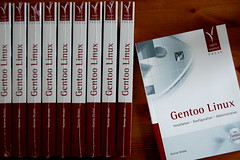
Gentoo Linux

I've waited since Friday and it finally arrived today. Another German Gentoo book is available now!

It concentrates on the experienced Linux user and tries to achieve two things:

  • Get you running on Gentoo if you never used it before
  • Highlight the central Gentoo tools and provide a reference for their usage

For new users it should be possible to grab a laptop, insert the DVD and run through large parts of the book without ever connecting to the net. Thus the first steps with Gentoo are hopefully pleasant.

Even the early chapters feature larger sections that provide in-depth knowledge for the more experienced Gentoo users. All tools, options, variables and concepts are referenced in the thirty index pages of the book. So it should be a good companion while working with Gentoo.

If you need more details you can check the table of contents or even read the chapter on writing ebuilds.

One of the later chapters - "Extending Gentoo" - can be considered the main origin of the whole story. It talks about overlays.gentoo.org and layman.

About two years ago I sat down on a weekend to code the basis for layman in order to make the use of overlays.gentoo.org as easy as possible. I certainly didn't expect this to have any significant effect. After all layman always was - and still is - a rather trivial script.

But since I liked the whole idea about overlays I decided to write a small article about this concept as well as how layman fits into that. This got published in the German Linux magazine and had one unexpected result: I got an email from OpenSourcePress asking whether I'd like to write a whole book about Gentoo. At that time the answer was "yes".

Would it be "no" today? I'm not certain. I have to say that I hated the three weeks of pure text editing in the final phase of the project. It reminded me far too much of my PhD thesis. Yes, I like writing stuff: emails, wiki pages, blog entries, source documentation, ... you name it. Small stuff. Epic texts turn out to be much harder.

What definitely made it bearable in this case were the systems provided by OpenSourcePress: They give you a subversion repository and the whole text is done in Latex. They also work with Emacs on their end which happens to be my favorite editor too.

And one thing about their subversion repository is really great: You commit crudely written techno-babble on your side and a few revisions later it comes back in well readable German. This is what I definitely liked most about the whole project: Getting rewritten to readable language. Big kudos to the team of editors which really does great job.

So would I do it again? Well, I don't have to decide on that anymore. The basis is there so all there will be are further revisions. And that will hopefully be easier than the first version.

But for now I'll keep the book closed and continue coding...

Wednesday, December 19, 2007

Polymeraze: Time for merging

Polymeraze is a tool that I wrote about two years ago. This package allowed me to cope with more than ten Gentoo servers at the same time. One of the main problems with many machines is to keep up with the configuration of the machines.

Polymeraze allows you to create kind of knowledge base for configurations that can be applied to multiple hosts. It basically uses some template configurations which are being converted into the final configuration files by combining them with the specific host profile.

While this tool was extremely handy it was also a bad hack since I wired it directly into the Gentoo package management system. This basically never really worked but since I knew how to handle it I just didn't mind too much.

A while ago I realized that this tool has a few common properties with the good old "kolabconf" from the Kolab project. And since then I have dreamed of replacing kolabconf with a rewritten polymeraze.

I hope that this merge will finally lead to a tool that will allow to get a really solid Kolab server natively integrated into the Gentoo system.

Well, there is still plenty of work ahead. All I did so far is getting the project page up. And now it is time for coding...

Thursday, December 06, 2007

K2G News: Update of the project site

The project site got a few updates and new links. In addition a Ohloh project summary has been created.

K2G: Kolab2/Gentoo getting attention again

Finally the Kolab2Gentoo project gets some attention again. I started fixing some older bugs but the main part will be to prepare for 2.2 now. I still hate the way the whole project is structured but there are too many places where massive improvements are needed. So I guess I have to be content with small progress. The stuff that is currently on my mind concerning Kolab2/Gentoo-2.2:
  • Update to Horde-3.2
  • Making the patched c-client and php packages recommended instead of required
  • Switching to a specific cyrus-imapd-kolab package
  • Template packages
And then there is the big, bad problem of the Kolab configuration concept that simply fails for Gentoo in its current form. The solution to that one will take even longer.

Sunday, September 03, 2006

Virtual servers get converted to Gentoo

It looks like a number of people are not too happy about running SuSE on their virtual servers. I got a good deal of feedback on my HowTo that describes the conversion of a virtual server preinstalled with SuSE. I integrated all fixes and improvements that I received from various contributors. Thanks a lot to all of them!

While the instructions were initially targeted at the servers provided by 1 and 1 it definitely also works for the servers of Strato. Anyone with a success story on the servers of other companies?